
Campaigns
Create your first campaign
Go from an empty campaign to a canvas that starts with the hub.
A campaign connects a main marketing piece with related pieces, such as emails and social posts. This guide takes you from an empty campaign to a prompt you can use in your AI tool.
Before you begin
Choose the right saved brand with Switch in the sidebar. Review and edit its website scan first. That edit is required before this campaign. Have a campaign goal and source content ready.
Open Campaigns
In the sidebar, open the Campaigns group. Choose Start a New Campaign or Manage Campaigns.
If you open the Campaigns address itself and campaigns or saved plans already exist, you reach Manage Campaigns. Otherwise you reach Start a New Campaign. Open an existing campaign with Open canvas, or start a new one.
Create a campaign
On Start a New Campaign, the page heading is Start a new campaign for followed by the brand name. For your first campaign, use Start from scratch. Enter a name and answer What is the purpose of this campaign? Choose Lead gen, Awareness, Product conversion, or Event. Then choose Create and open canvas.
An event also asks for Event name. Event date is optional. Until a date is set, copy keeps {date} in its place.
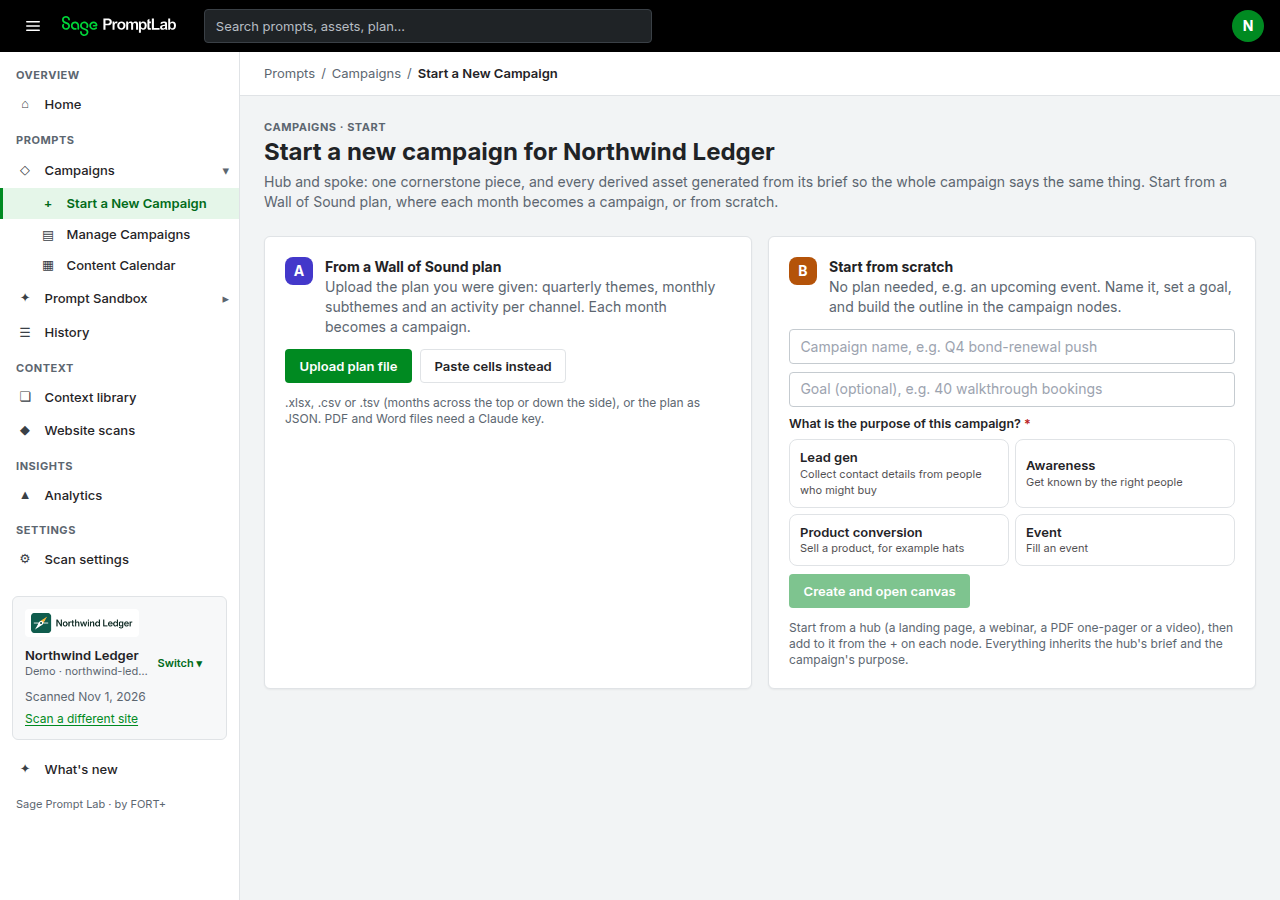
Northwind Ledger is a fictional demo brand. Start from scratch asks for a name and What is the purpose of this campaign?, then Create and open canvas. From a Wall of Sound plan is the other card on the same page. When a plan is already saved, choose a month and Create campaign. That creates the main piece and the enabled related pieces for the quarter or month you chose. You still answer the purpose, then Create and open canvas. The same card also has Upload plan file for a plan file you were given.
To rename a campaign later, edit the canvas title. It saves when you click or move away from the title field.
Next: Set up your main piece (hub).